Service tokens
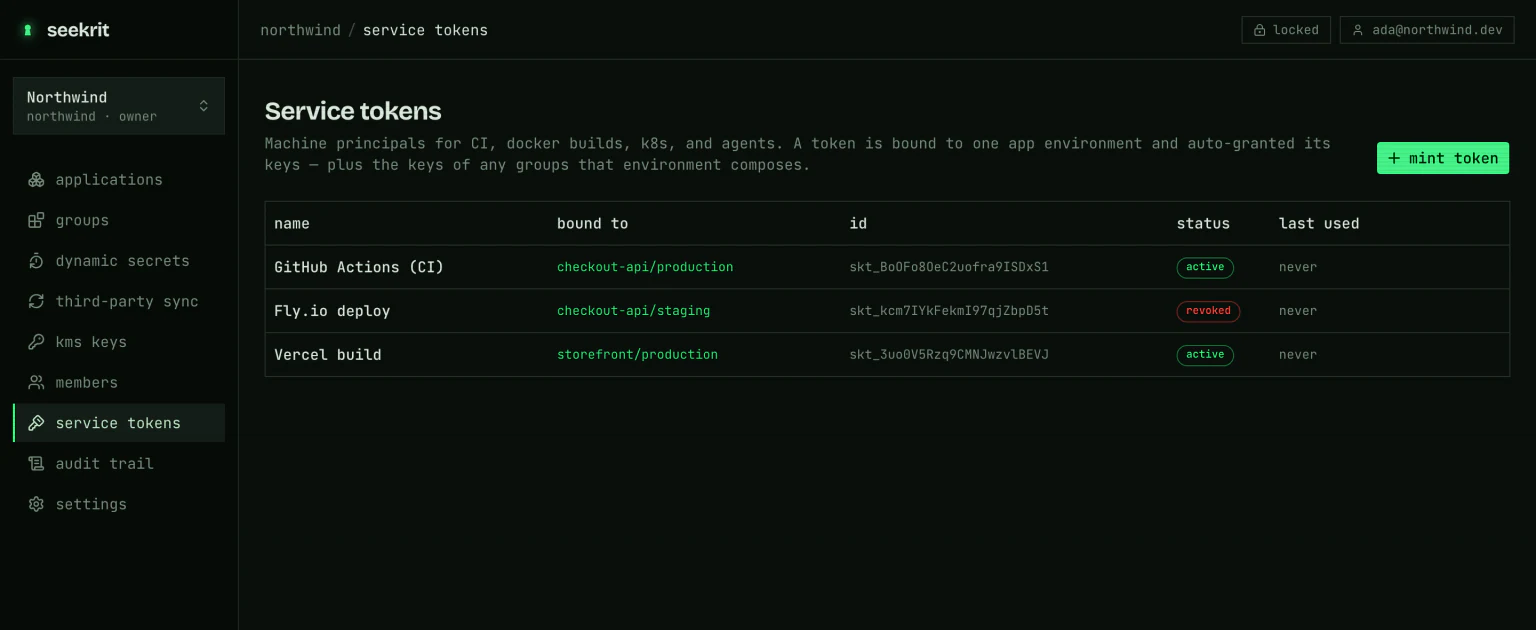
Service tokens are credentials for machines — CI jobs, Docker builds, Kubernetes workloads, and agent sandboxes. Each is an independent principal bound to one application environment: that binding selects the org, app, and environment it resolves at runtime, plus the group slices composed into it. A token can be revoked on its own.
How they work
A service token is self-contained: the token string carries its own private key. The server stores only a SHA-256 hash of the token (to authenticate it) and its public key (to wrap environment keys to it). This means a machine holding the token can unwrap any environment DEK granted to it entirely offline — the server never had the token's private key.
Because tokens are generated on the client, the full token is shown once at creation. Copy it then; it cannot be retrieved later.
Creating a token
In the web dashboard: Organization → Service tokens → Mint token. You can also mint from
where you notice the need for one — an environment's Key access panel, the no token warning
on a matrix column, the application setup checklist, or the Connect panel — and those pre-fill the
binding. Either way, copy the skt_… value from the one-time dialog.
Minting in an organization that has no application environment yet doesn't dead-end: the dialog offers to create an application (its environments come with it) and then carries on with the binding pre-selected.
With the CLI, bind the token to an application environment. Creation auto-grants that environment's key and every group composed into it (at the matching slug):
seekrit token create --name ci-deploy --app storefront --env production
# prints:  skt_XXXXXXXX_...    (save it now)
To also authorize an alternate group slice for run --with overrides, add --allow:
seekrit token create --name dev --app storefront --env dev --allow auth-providers=staging
Pass --no-grant to mint the token without any grants, then grant environments explicitly:
seekrit token create --name ci-deploy --app storefront --env production --no-grant
seekrit grant --token skt_XXXXXXXX --app storefront --env production
Admin tokens
By default a token holds member-level API access — its real power is the environment keys
wrapped to it. Pass --admin to mint an org-scoped admin token that also passes admin-gated
routes: creating apps, groups, and environments, composing groups, granting keys, and minting
further tokens. This is what lets automation and AI agents provision structure headlessly, with no
browser session.
seekrit token create --name agent-admin --admin
# org-scoped: no --app/--env needed
An admin token needs no environment binding to provision, but you can still bind one
(--admin --app storefront --env production) so it can both manage structure and decrypt that
environment. Only an admin caller (an admin user, or another admin token) may create an admin
token — capability never escalates itself. Scope admin tokens tightly and prefer a short lifetime.
Using a token
Set it as SEEKRIT_TOKEN; it selects the org, app, and environment on its own:
export SEEKRIT_TOKEN=skt_XXXXXXXX_...

seekrit export --format dotenv
seekrit run -- ./deploy.sh
Service tokens never need a passphrase — their private key is in the token string. A token can only read or write the environments it was granted (its bound env + composed groups); it cannot reach other environments in the org.
Granting and revoking
Grants are per-environment. Grant a token from any environment's Key access panel, or with
seekrit grant --token <id> --app <app> --env <env>. When a token is retired:
seekrit token revoke skt_XXXXXXXX
Revocation takes effect on the token's next request: revoking drops the cached copy of the token record that authentication reads, as part of the same operation. In the rare case that a copy somewhere outlives the revoke, it is re-checked against the database within a minute of continued use, so a stale copy corrects itself rather than lingering.
If you need a hard cutoff — a leaked token, a departing teammate — revoke and then rotate the environment key. Revoking the grant doesn't rotate the key, and rotation is what makes a DEK the token already fetched useless; see Access & key grants.
Deleting
Revocation is the reversible-safe step: a revoked token authenticates nothing and stops counting against your plan's token limit, but it stays in the list so you keep the audit trail. When you want it gone for good, delete it:
seekrit token delete skt_XXXXXXXX
Deletion is only allowed after a token is revoked, and it can't be undone — it drops every
environment/KMS key grant that was wrapped to the token and hides it from your token list. The token
record itself is retained for the audit trail (a soft delete); it just no longer appears anywhere or
holds any keys. In the dashboard the delete action appears in the token's row once it shows as
revoked.
Treat a service token like a password with decryption power. Scope it to only the environments it needs, store it in your platform's secret store (not in the repo), and rotate the environment key if a token leaks.
Listing tokens
seekrit token list
Shows each token's id, name, status (active / expired / revoked), and last-used time.
Last-used is a coarse "when was this seen" signal, not a request log: it is recorded off the read path and settles within a couple of minutes, so a token that just resolved may still show its previous time. Use it to spot a credential nobody uses any more — for per-request history, read the audit trail.
Watching for leaked tokens
A real token that escapes into an archived repo or a retired CI pipeline is the thing you can't see. Honey tokens are the other half of that problem: decoy credentials, identical in format to the tokens above, that unlock nothing and email your admins the instant anyone tries one. Plant one alongside wherever your real credentials have historically ended up, and you find out that a place has been read — instead of finding out later.